# Park Crowds knowledge base
The whole Park Crowds help center in one file, for support agents and offline reading. Web version: https://www.whentovisitparks.com/help. Updated 2026-11-20. Support: support@coldpress.dev.
## Facts
- Park Crowds (App Store name Park Crowds: Best Time to Go) is a free iPhone app from ColdPress LLC, the companion to whentovisitparks.com. It shows when each of 390 National Park Service units is busy and when it's quiet, month by month, with the best month to visit and the average high temperature.
- Version 1.0.0 (build 1), ready for App Review on November 20, 2026; not on the App Store yet.
- Free: the map, search, every reading, details, directions, sharing and up to five saved parks. Park Crowds Plus: unlimited saved, Compare (up to three) and the full planner list. $24.99 a year with a 1-week free trial (Apple introductory offer), or $3.99 a month.
- The plans screen is shown with Superwall; the purchase is Apple's in-app purchase. Restore: More > Restore purchases. Cancel: iPhone Settings > Apple Account > Subscriptions. Refunds: Apple only, reportaproblem.apple.com.
- No account, no sign-in, no ads, no tracking. Saved parks stay on the iPhone. Location only when Near me is tapped, used on the phone. Superwall and Expo receive anonymous data as the privacy policy says.
- Web: https://www.whentovisitparks.com (help /help, privacy /privacy-policy, terms /terms). Support: support@coldpress.dev (More > Send feedback in the app).
## Contents
- Start here: [Park Crowds at a glance](#overview), [Getting started](#getting-started)
- How-to guides: [The map and search](#map-and-search), [What a park page shows](#details), [Saved and Compare](#saved-and-compare), [Where to go in a month](#planner)
- Account and billing: [Park Crowds Plus and billing](#subscription)
- Privacy and data: [Privacy and your data](#privacy)
- Troubleshooting: [Troubleshooting](#troubleshooting)
- FAQ: [Park Crowds questions and answers](#faq)
- Support desk (rules for the support email agent, not on the website): [Rules for answering Park Crowds support email](#support-desk-rules)
---
## Park Crowds at a glance
Start here · https://www.whentovisitparks.com/help/overview · updated 2026-11-20
What the Park Crowds iPhone app does, where its data comes from, what is free, what Park Crowds Plus costs, and how the free trial works.
### What it does
Park Crowds is an iPhone app that shows when each of 390 National Park Service units is busy and when it's quiet, month by month, with the best month to visit and the average high temperature. It's the iPhone companion to [whentovisitparks.com](https://www.whentovisitparks.com): the same data, built for your phone, with a map, search, saved parks and a planner.
### Who it's for
Anyone planning a national park trip who wants fewer crowds and good weather.
### Where the data comes from
National Park Service visitor counts and NOAA 30-year climate normals from the nearest station. **More → About the data** shows the source and the date it was last updated. The crowd index compares each month with the park's own average month, so a quiet month at a famous park can still be busy.
### Where it runs
| Question | Answer |
| --- | --- |
| iPhone | Yes, from the App Store as Park Crowds: Best Time to Go. |
| iPad, Android | No iPad or Android app. |
| Web | [whentovisitparks.com](https://www.whentovisitparks.com) has the full pages, methods and places to stay. |
### What it costs
| Plan | Price |
| --- | --- |
| Park Crowds | Free: the map, every reading, search, details and up to five saved parks |
| Park Crowds Plus, yearly | $24.99 a year, with a 1-week free trial |
| Park Crowds Plus, monthly | $3.99 a month |
Prices are in US dollars; the App Store shows your local price.
### What Plus adds
- Save as many parks as you like (free keeps five).
- Compare up to three side by side.
- The full where to go in a month list, not just the top five.
Everything else stays free.
### How paying works
Plus is sold through the App Store and charged to your Apple Account; Park Crowds never sees your card. The plans screen (shown with Superwall) opens when you reach a Plus feature. The yearly plan starts with a 1-week free trial: you're charged $24.99 when the week ends unless you cancel at least 24 hours before. Plans renew automatically until you cancel in iPhone **Settings → Apple Account → Subscriptions**. Apple handles refunds. See [Park Crowds Plus and billing](https://www.whentovisitparks.com/help/subscription).
### No account
There's no sign-up. Saved parks stay on your iPhone. See [Privacy and your data](https://www.whentovisitparks.com/help/privacy).
---
## Getting started
Start here · https://www.whentovisitparks.com/help/getting-started · updated 2026-11-20
Install Park Crowds, allow your location if you like, and find, open and save your first park. No account and no sign-up.
### Install
1. On your iPhone, open the App Store and search for **Park Crowds: Best Time to Go**.
2. Tap **Get**. The app is free.
3. Open it. It starts on the **Map**.
There's no account to create and nothing to sign in to.
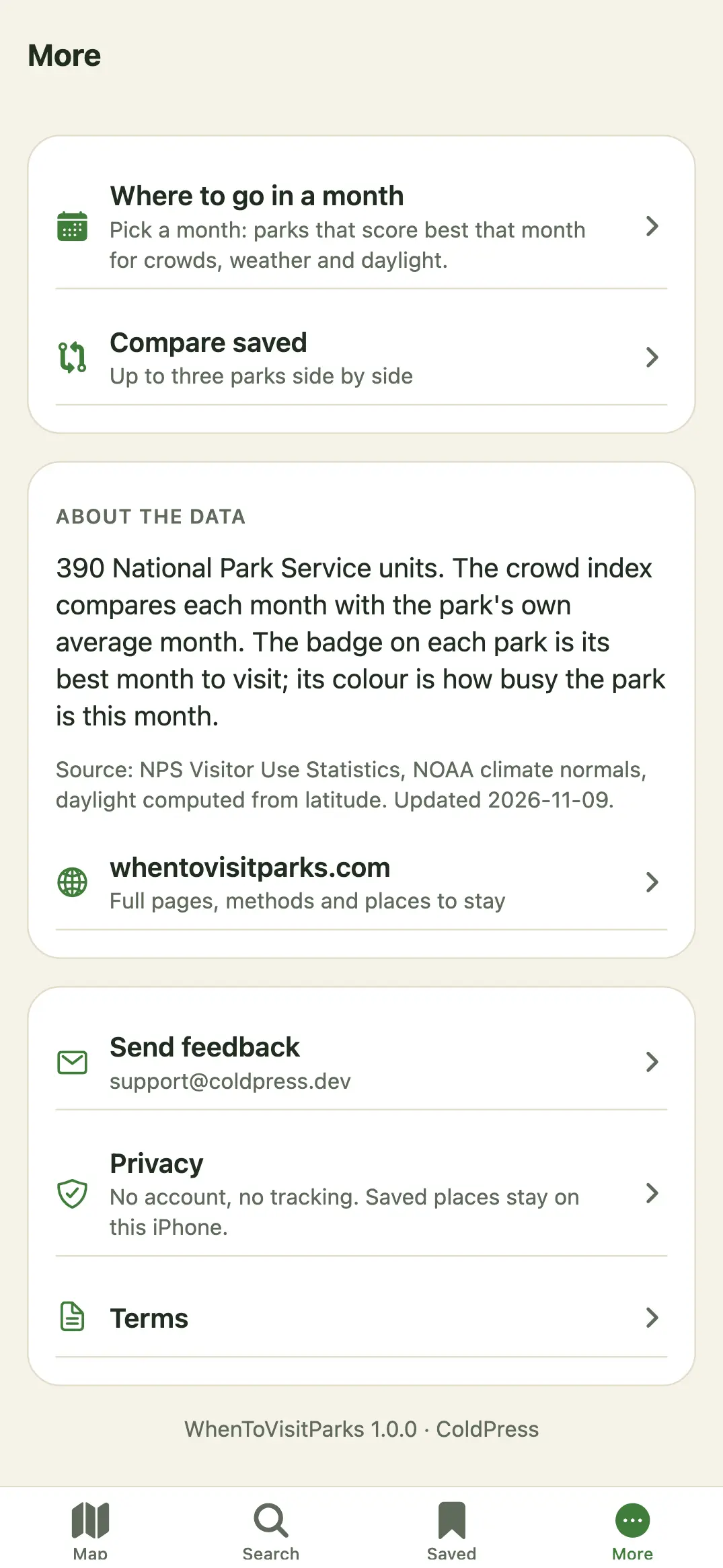
### The four tabs
| Tab | What it's for |
| --- | --- |
| **Map** | Every park on a map, with cards along the bottom for the ones in view. **Near me** and the **Where to go in a month** planner are the buttons at the top right. |
| **Search** | Find a park name or state. |
| **Saved** | The parks you saved, and **Compare**. |
| **More** | The planner, Compare saved, Park Crowds Plus, Restore purchases, About the data, Send feedback, Privacy and Terms. |
### Find your first park
1. On the Map, move and zoom to an area, or tap **Near me** (the arrow at the top right).
2. Tap a card along the bottom, or a pin, to open the park.
3. Tap **Save** to keep it in Saved.
### Permissions
| Permission | Why |
| --- | --- |
| Location (While Using) | Only when you tap **Near me**, to show the parks near you and sort by distance. It's used on the phone and isn't sent to us or stored on a server. |
Park Crowds doesn't ask for notifications, contacts, photos or tracking. You can turn location off any time in iPhone **Settings → Park Crowds**.
---
## The map and search
How-to guides · https://www.whentovisitparks.com/help/map-and-search · updated 2026-11-20
Move the map, use Near me, read the pins and cards, and search for a park name or state.
### The map
The **Map** tab shows every park with a location. Each pin's badge is the park's best month; its color is how busy the park is this month. The pin and card labels always pair a color with words, so you never have to rely on color alone.
1. Pinch and drag to move around.
2. Cards along the bottom follow what's in view (up to 25). Swipe them sideways.
3. Tap a card or a pin to open that park.
### Near me
Tap the arrow button at the top right. The first time, iOS asks to allow your location while you use the app. The map moves to where you are, and cards show the distance in miles. Your location stays on your phone.
### Search
1. Tap **Search**.
2. Type a park name or state. Results update as you type; every word you type must match.
3. Tap a result to open it.
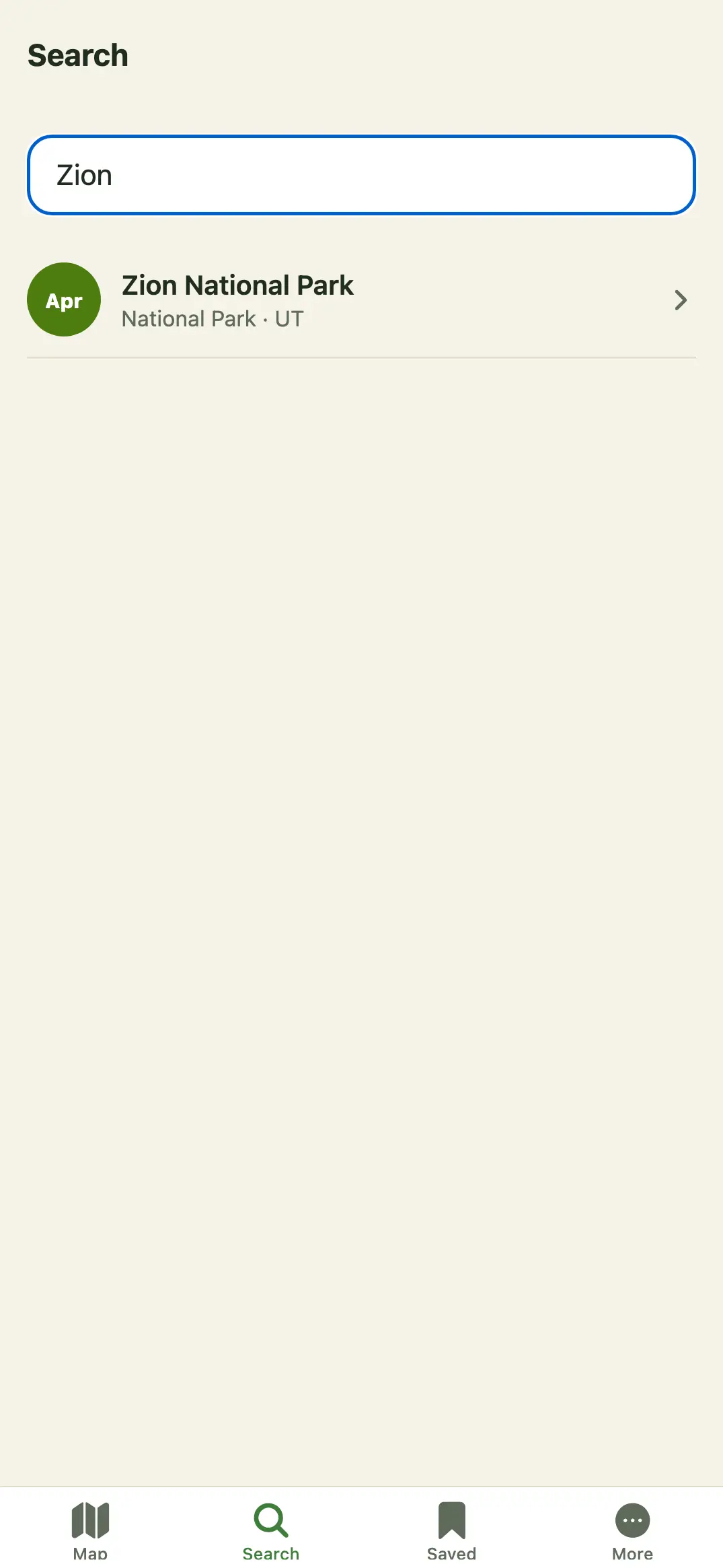
Searching works offline, because the data is inside the app.
---
## What a park page shows
How-to guides · https://www.whentovisitparks.com/help/details · updated 2026-11-20
Everything on a park's page in Park Crowds: the readings, the record, Save, Directions, Share, places to stay and the full page on the website.
Open any park from the Map, Search, Saved or the planner.
### What's on it
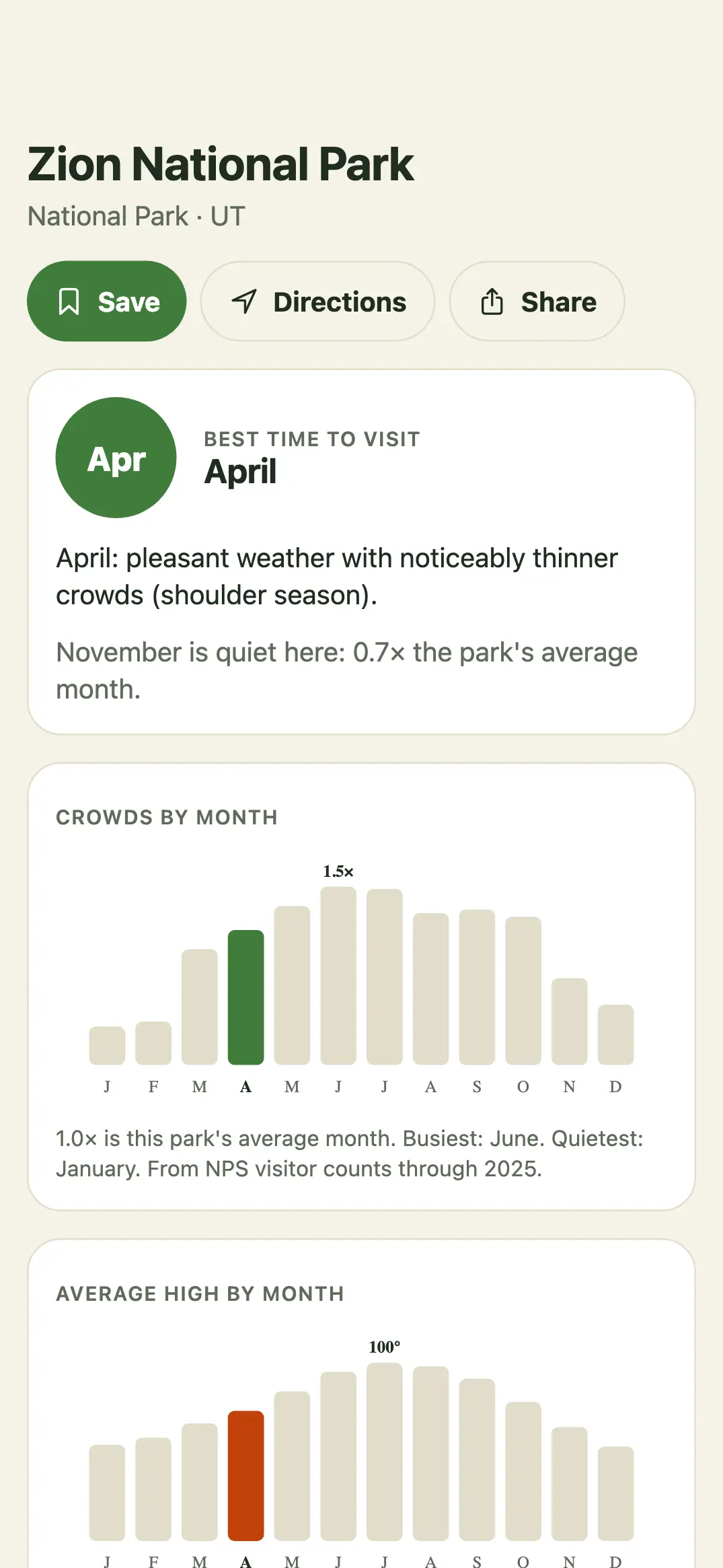
The page shows **Best time to visit**, **Crowds by month** (a crowd index where 1.0 is the park's own average month), **Average high by month**, and **The record**: visits a year and the ten-year trend.
The crowd index compares each month with the park's own average month, so a quiet month at a famous park can still be busy.
### The buttons
- **Save** keeps it in the Saved tab. Tap again to remove it.
- **Directions** opens Apple Maps with directions there.
- **Share** sends a link to its page on whentovisitparks.com.
- **Places to stay nearby** opens places to stay listed by Stay22 on our website, when there are any.
- **Full page on whentovisitparks.com** opens the website's page in Safari, with methods and more detail.
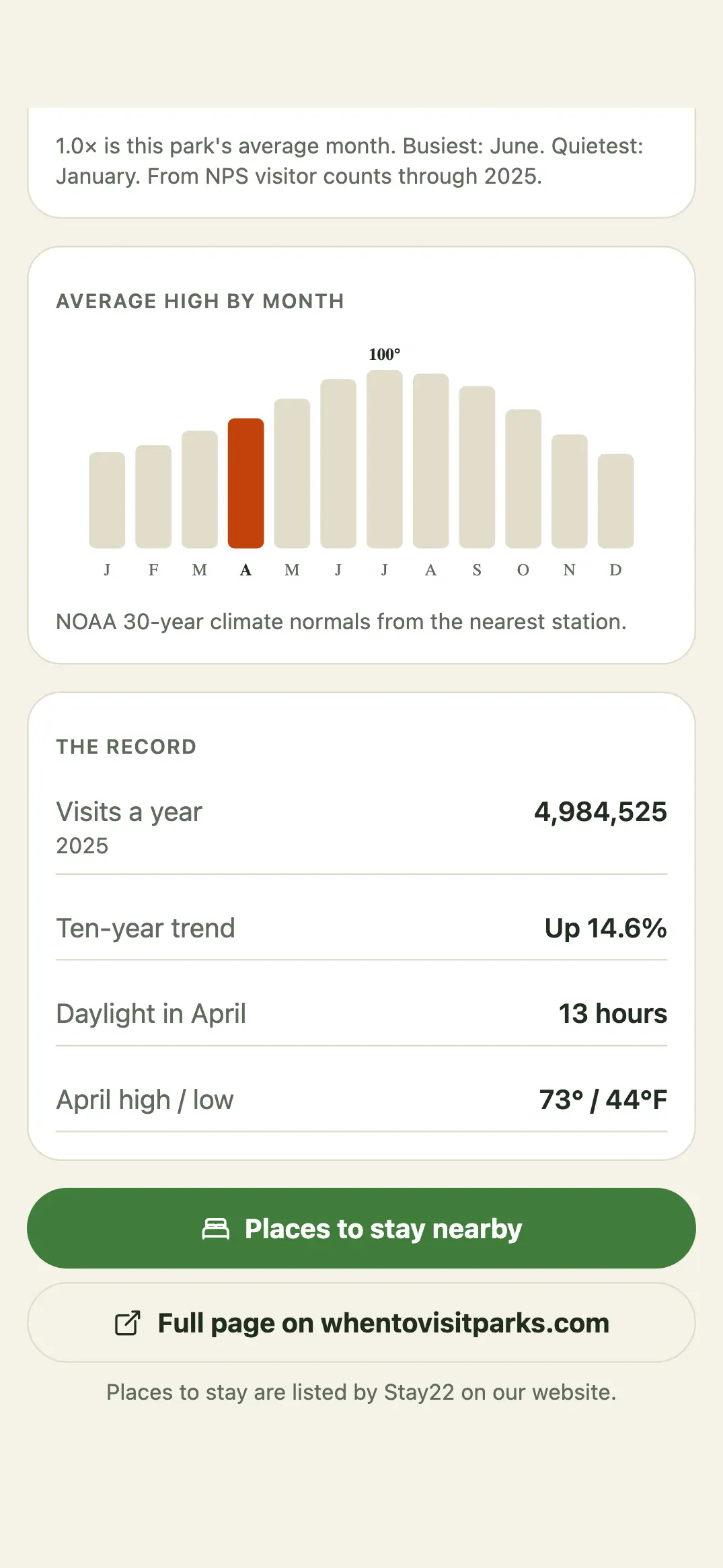
"No reading" means there's no measurement for that item; the app never guesses.
---
## Saved and Compare
How-to guides · https://www.whentovisitparks.com/help/saved-and-compare · updated 2026-11-20
Save parks to your iPhone, find them in Saved, and compare up to three side by side with Park Crowds Plus.
### Save a park
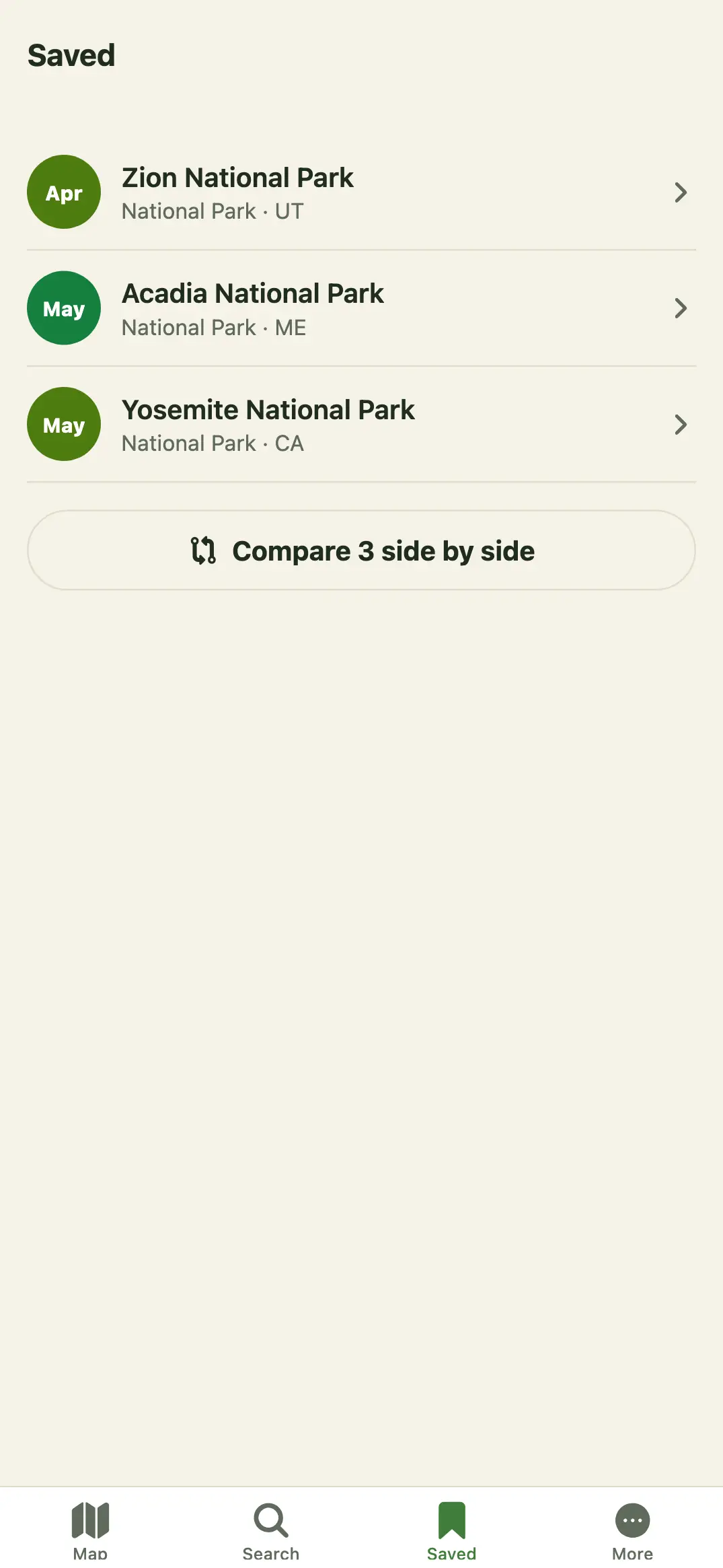
Open it and tap **Save**. It appears at the top of the **Saved** tab. Tap **Save** again on its page to remove it.
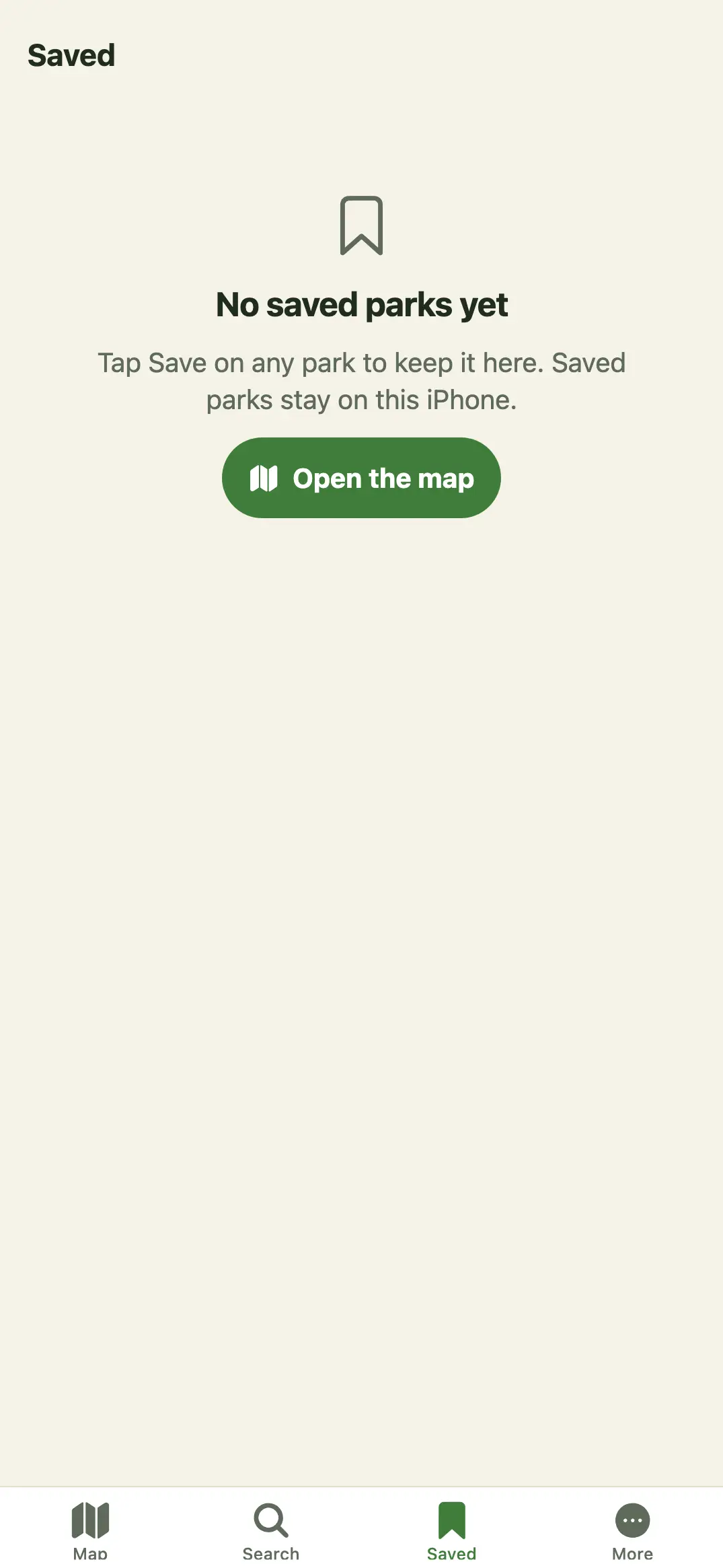
Free keeps five saved parks. Saving a sixth opens the Park Crowds Plus screen; with Plus there's no limit. Saved parks stay on this iPhone; there's no account, so they don't move to another phone.
### Compare
1. Save at least two parks.
2. In **Saved**, tap **Compare … side by side** (or **More → Compare saved**).
3. See up to three side by side: Best month, This month, Busiest month and Visits a year.
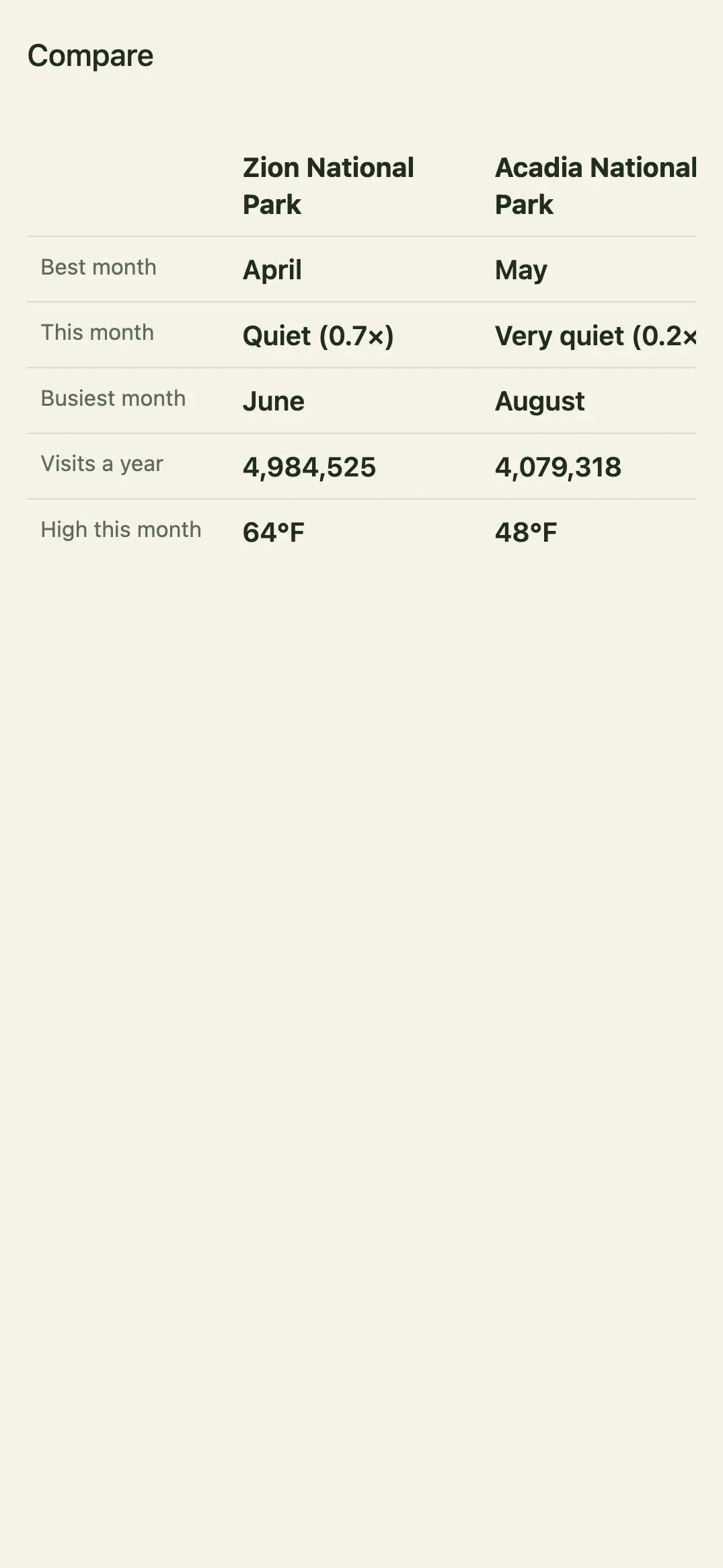
Compare is part of Park Crowds Plus. Without Plus, the button opens the Plus screen. See [Park Crowds Plus and billing](https://www.whentovisitparks.com/help/subscription).
---
## Where to go in a month
How-to guides · https://www.whentovisitparks.com/help/planner · updated 2026-11-20
Pick a month: parks that score best that month for crowds, weather and daylight. Free shows the top five; Plus shows the full list.
Open it from the calendar button at the top right of the Map, or **More → Where to go in a month**.
1. Pick a month.
2. Tap **Near me** to put the nearest first (tap again to go back).
3. Tap any row to open it.
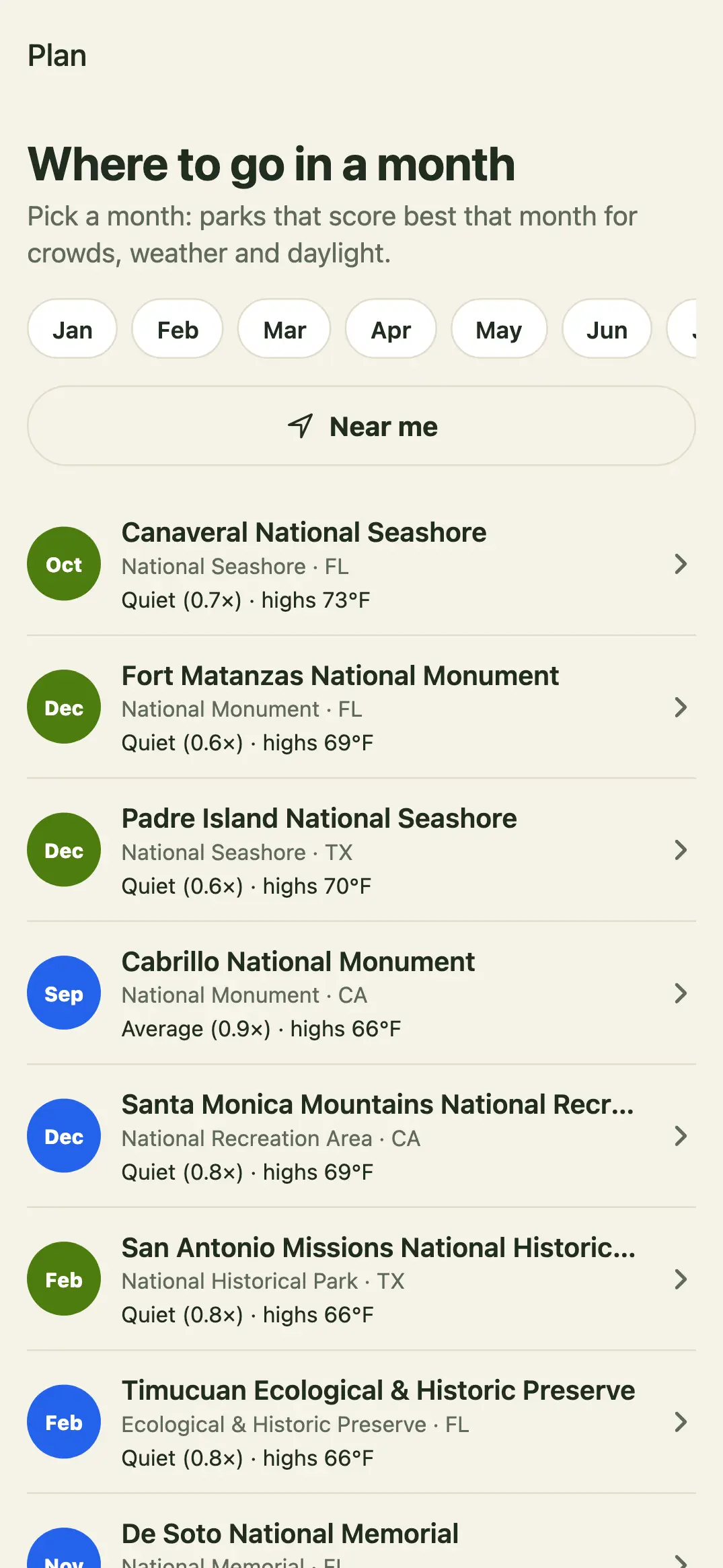
Free shows the top five. With Park Crowds Plus you see the full list; without it, **See the full list** opens the Plus screen and says how many more there are.
---
## Park Crowds Plus and billing
Account and billing · https://www.whentovisitparks.com/help/subscription · updated 2026-11-20
What Park Crowds Plus adds, $24.99 a year with a 1-week free trial or $3.99 a month, and how to subscribe, restore, cancel and get a refund.
### What Plus adds
| Free | Park Crowds Plus |
| --- | --- |
| The map, search and every reading | Everything free, plus: |
| Up to five saved parks | Unlimited saved parks |
| The planner's top five | The full planner list |
| | Compare up to three side by side |
### Prices and the free trial
- **Yearly**: 1 week free, then $24.99 a year (about $2.08 a month).
- **Monthly**: $3.99 a month, no trial.
The trial is Apple's: if you start the yearly plan and don't cancel at least 24 hours before the week ends, Apple charges $24.99 and the plan renews every year. Prices are in US dollars; Apple shows your local price before you confirm.
### Subscribe
1. Reach a Plus feature: save a sixth park, tap Compare, tap **See the full list**, or open **More → Park Crowds Plus**.
2. On the plans screen, pick **Yearly** or **Monthly**.
3. Tap **Start my free trial** (yearly) or the button for monthly, and confirm on Apple's sheet with Face ID or your password.
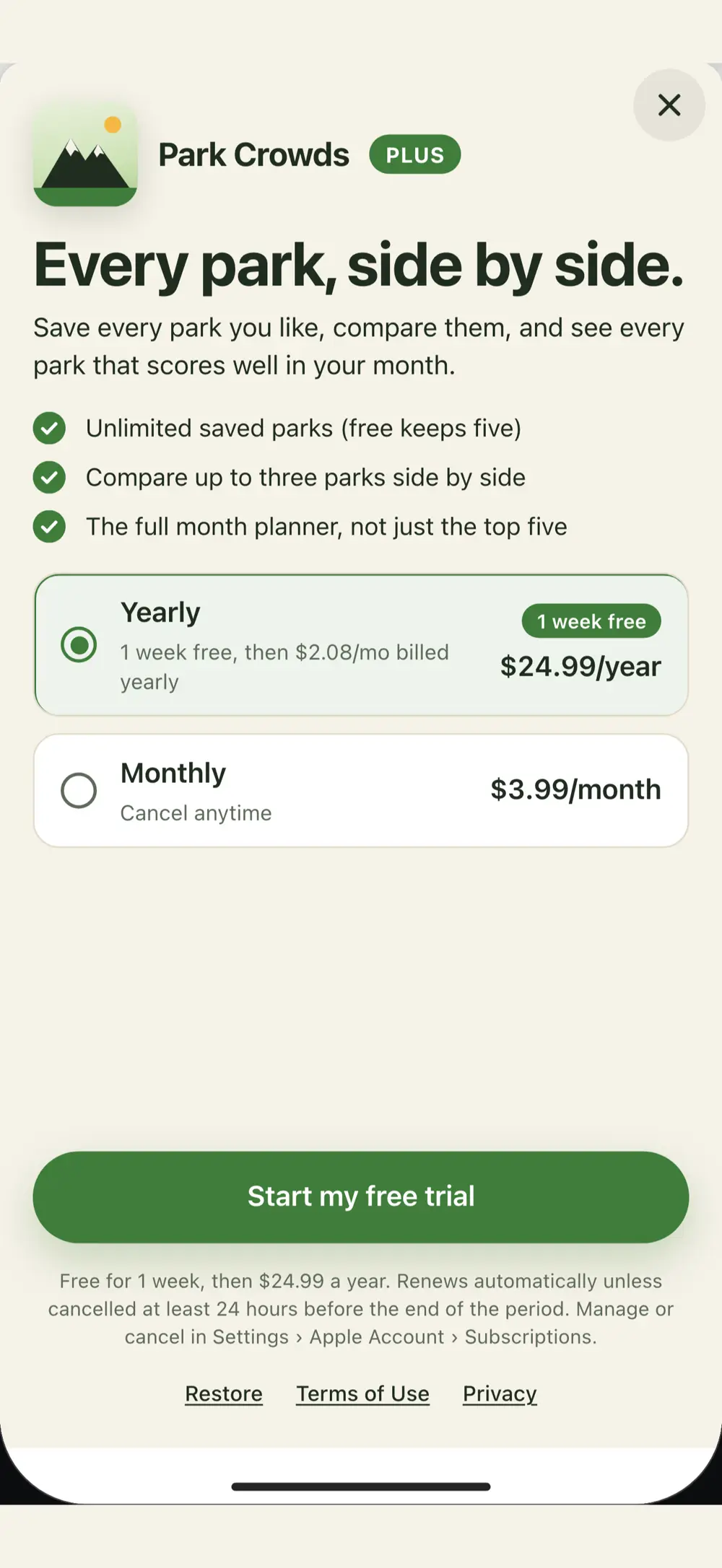
The plans screen is shown with Superwall; the purchase itself is Apple's in-app purchase. If the plans can't load (no connection), a Park Crowds Plus screen says Plus can't be bought right now: try again in a moment.
### Restore on a new iPhone or after reinstalling
**More → Restore purchases** (or **Restore** on the plans screen), signed in to the App Store with the Apple Account that paid. **Purchases restored** means it worked; **Nothing to restore** means that Apple Account has no Park Crowds Plus.
### Switch plans or cancel
On your iPhone open **Settings → Apple Account (your name) → Subscriptions → Park Crowds**. Pick the other plan, or tap **Cancel Subscription** at least 24 hours before it renews (or before the trial week ends). You keep Plus until the end of the period. Deleting the app doesn't cancel it.
### Refunds
Apple handles every App Store payment, so we can't issue refunds. Request one at [reportaproblem.apple.com](https://reportaproblem.apple.com) with the Apple Account that paid: pick the Park Crowds charge and **Request a refund**.
### No account
Park Crowds has no account, so there's nothing to sign in to, reset or delete. Plus belongs to your Apple Account. There's no data export: your saved parks are a short list on your phone.
---
## Privacy and your data
Privacy and data · https://www.whentovisitparks.com/help/privacy · updated 2026-11-20
Park Crowds has no account and no ads. What stays on your iPhone, what Superwall and Expo receive, and how location is used.
### Where each kind of data lives
| Data | Where it's kept |
| --- | --- |
| Saved parks and settings | This iPhone only. Deleting the app removes them. |
| Your location | Used on the phone while the app is open, when you tap Near me. Not sent to us or stored on a server. |
| Plus purchase | Apple takes payment. We never receive your Apple ID or payment details. |
| Plus screens | Superwall gets an anonymous ID it makes for the app, which Plus screens you saw, your purchase status and basic device details (iPhone model, iOS version, language). Not linked to your name. |
| Crashes and performance | Crash reports and measurements like launch time go to Expo, not linked to you, only to keep the app working. |
### What it never does
- No account, no sign-in, no ads.
- No tracking across other companies' apps or websites, and no selling of data.
### Turn things off
Turn location off any time in iPhone **Settings → Park Crowds → Location**. Delete the app to remove your saved parks.
### The full policy
The [privacy policy](https://www.whentovisitparks.com/privacy-policy) covers the website and the iPhone app. Questions: support@coldpress.dev.
---
## Troubleshooting
Troubleshooting · https://www.whentovisitparks.com/help/troubleshooting · updated 2026-11-20
Fixes for Near me, Plus not unlocking, the plans screen not loading, a missing park and saved parks after reinstalling.
### Near me doesn't work
1. Tap **Near me** again; the first time, choose **Allow While Using App**.
2. If you chose Don't Allow, open iPhone **Settings → Park Crowds → Location** and pick **While Using the App**.
3. Check that Location Services is on in **Settings → Privacy & Security → Location Services**.
### I paid but Plus features still ask me to subscribe
1. **More → Restore purchases**, signed in to the App Store with the Apple Account that paid.
2. Check **Settings → Apple Account → Subscriptions** shows Park Crowds as active.
3. With Ask to Buy, Plus starts after the purchase is approved.
4. Close and reopen the app.
### "Plus can't be bought right now"
The plans couldn't load, usually because there's no connection. Check your connection and try again in a moment.
### I can't find a park
Search for a park name or state, using fewer words. Every word must match. Some parks have no location and won't appear on the map, but they're in search.
### My saved parks are gone
Saved parks live only on the iPhone that saved them. They're removed if the app is deleted and don't move to a new phone. Plus comes back with **Restore purchases**; save the parks again.
### A reading looks wrong or old
**More → About the data** shows the source and date. The crowd index compares each month with the park's own average month, so a quiet month at a famous park can still be busy. To report a wrong reading, use **More → Send feedback** and name the park.
### Something else
Update Park Crowds from the App Store, then close and reopen it. If it's still not right, use **More → Send feedback** or email support@coldpress.dev with your iPhone model, iOS version and what you tapped.
---
## Park Crowds questions and answers
FAQ · https://www.whentovisitparks.com/help/faq · updated 2026-11-20
Straight answers to what people ask most about Park Crowds: the data, saving and comparing, Plus, the free trial, cancelling, refunds and privacy.
### About the app
#### What is Park Crowds?
An iPhone app that shows when each of 390 National Park Service units is busy and when it's quiet, month by month, with the best month to visit and the average high temperature. See [Park Crowds at a glance](https://www.whentovisitparks.com/help/overview).
#### Is Park Crowds free?
Yes. The map, search, every reading and five saved parks are free. Park Crowds Plus adds unlimited saved parks, Compare and the full planner list.
#### Do I need an account?
No. There's no sign-up. Saved parks stay on your iPhone.
#### Is there an Android or iPad version?
No, Park Crowds is made for iPhone. The website whentovisitparks.com works in any browser.
#### Does it work offline?
Yes. The data is inside the app, so the readings, search and saved list work without a signal. The map, directions, the website and buying Plus need a connection.
#### Where does the data come from?
National Park Service visitor counts and NOAA 30-year climate normals from the nearest station. More → About the data shows the date.
#### What does the crowd index mean?
It compares each month with the park's own average month: 1.0 is average, under 1 is quieter, over 1 is busier.
#### Does it cover state parks?
No. Park Crowds covers 390 National Park Service units. The website has more pages.
### Using it
#### How do I find parks near me?
Tap Near me (the arrow at the top right of the Map) and allow your location while using the app.
#### How do I save a park?
Open it and tap Save. It appears in the Saved tab. See [Saved and Compare](https://www.whentovisitparks.com/help/saved-and-compare).
#### Why can't I save more than five parks?
Free keeps five. Park Crowds Plus saves as many as you like.
#### How do I compare parks?
Save at least two, then tap Compare in Saved. Compare is part of Plus.
#### What is Where to go in a month?
Pick a month: parks that score best that month for crowds, weather and daylight. See [Where to go in a month](https://www.whentovisitparks.com/help/planner).
#### Can I get directions?
Yes. Open the park and tap Directions to open Apple Maps.
#### Can I share a page with a friend?
Tap Share on the park's page to send a link to its page on whentovisitparks.com.
#### How do I report a wrong reading?
More → Send feedback, and name the park.
### Plus and billing
#### How much is Plus?
$24.99 a year with a 1-week free trial, or $3.99 a month. See [Plus and billing](https://www.whentovisitparks.com/help/subscription).
#### Will I be charged when the free trial ends?
Yes, if you started the yearly plan and don't cancel at least 24 hours before the week ends, Apple charges $24.99 for the year.
#### How do I cancel?
iPhone Settings → Apple Account → Subscriptions → Park Crowds → Cancel Subscription.
#### Can I get a refund?
Apple handles App Store payments. Request one at reportaproblem.apple.com with the Apple Account that paid.
#### I got a new iPhone. Do I pay again?
No. Tap More → Restore purchases with the same Apple Account.
#### Can I switch from monthly to yearly?
Yes, in iPhone Settings → Apple Account → Subscriptions → Park Crowds.
#### Does deleting the app cancel Plus?
No. Cancel in your Apple Account's Subscriptions.
### Privacy
#### Does the app track my location?
Only when you tap Near me, and only on your phone. It isn't sent to us or stored.
#### Does it show ads or track me?
No ads and no tracking across other apps or websites.
#### Can I move my saved parks to a new phone?
No. They stay on the iPhone that saved them.
### Getting help
#### How do I contact support?
More → Send feedback in the app, or email support@coldpress.dev and say it's about Park Crowds.
---
## Rules for answering Park Crowds support email
Support desk · not a web page · updated 2026-11-20
What the support email agent may answer on its own about Park Crowds, what goes to the owner, and how replies sound.
### Who is writing
Replies go from support@coldpress.dev with the sign-off "Park Crowds" on its own line. That address serves several ColdPress apps: if it isn't clear the email is about Park Crowds (the iPhone app or whentovisitparks.com), ask first. Never claim to be a person; if asked: "Replies here are written with the help of our support system. A person reads every conversation and steps in when needed."
### Answer on your own
- How-to questions from this knowledge base, with the one article link that helps.
- Prices and the trial, only these facts: free core; Plus $24.99 a year with a 1-week free trial (Apple's, charged when the week ends unless cancelled 24 hours before) or $3.99 a month.
- Explaining a charge, restoring, switching plans, cancelling in Apple's Subscriptions, and that Apple decides refunds at reportaproblem.apple.com. Never say a refund will be given.
- What a reading means, from the article on the park page; where the data comes from.
- Bug reports, data corrections and ideas: thank them, say it's logged, ask for the park's name, iPhone model and iOS version.
### Hand to the owner (hold the reply as a draft)
- Refund demands beyond Apple's process, chargebacks, anger or a second unhappy message.
- Requests to delete Superwall or Expo data, or any privacy, legal, press, partnership or data-licensing message.
- Questions about safety in the moment (for example whether it's safe to swim or ride right now): say plainly the app shows past records, point to posted signs and local authorities, and hold for the owner.
- A reading the knowledge base can't explain, or anything you're less than sure of.
### Never
- Promise a refund, a fix date or a free month.
- Say a place is safe; the app reports past records, not current conditions.
- Ask for Apple Account passwords or payment details (an Apple order ID from the receipt is enough to look up a purchase).
- Send links other than whentovisitparks.com, apple.com, support.apple.com, reportaproblem.apple.com and apps.apple.com.
### How replies sound
Plain text, two to four sentences, "Hi ," when known, otherwise "Hi,". Answer first, then the one step. Use the app's words: Map, Search, Saved, More, Near me, Where to go in a month, Compare, Park Crowds Plus, Restore purchases. No "Great question", "I hope this helps", "Rest assured", "Feel free to", no exclamation marks in a row, no em dashes.
### Facts that change
- Version 1.0.0 (build 1) is ready for App Review as of November 20, 2026 and isn't on the App Store yet. Until it is, people asking where to download it should be told it's coming soon and pointed to whentovisitparks.com.